IVAAP OSDU Supplemental
IVAAP Deployment Operations Guide
OSDU Supplemental
IVAAP 2025.1
Introduction
This supplemental guide covers OSDU specific configuration and operations for IVAAP installations not already covered in the standard Deployment Operations Guide. Most of IVAAP is largely the same in OSDU versus vanilla, but there are some key configurations worth highlighting.
Authentication
OSDU Deployments use OpenIDConnect based authentication, as such IVAAP should be delivered preconfigured with OIDC plugins enabled. The methods to enable these plugins and configure them follow:
Adminserver Configuration
Authentication details are configurable via environment variables for the adminserver. The adminserver is generic, and is used for all types of external authentication currently supported by IVAAP. The adminserver differentiates which type of authentication to use based on what environment variables are provided. For example, if no IVAAP_AWS_COGNITO environment variables are detected, the adminserver will dismiss cognito for auth, and will check for other variables. If no external authentication variables are detected, the adminserver will use local authentication. Below is an example of the AWS Cognito variables:
IVAAP_AWS_COGNITO_DISCOVERY_URL=https://cognito-idp.us-east-1.amazonaws.com/<Cognito userpool ID>/.well-known/openid-configuration
IVAAP_AWS_COGNITO_CLIENT_ID=<Client ID>
IVAAP_AWS_COGNITO_ENCRYPTED_CLIENT_SECRET=<Encrypted Client Secret>
IVAAP_AWS_COGNITO_SCOPE="openid email"
IVAAP_AWS_COGNITO_CALLBACK_URL=https://<IVAAP DNS>/IVAAPServer/api/v2/callback
IVAAP_AWS_COGNITO_VIEWER_URL=https://<IVAAP DNS>/ivaap/viewer/ivaap.html
IVAAP_AWS_COGNITO_END_SESSION_URL=https://cognito-idp.us-west-2.amazonaws.com/logout
IVAAP_AWS_COGNITO_USER_LAST_NAME_FIELD=username
IVAAP_AWS_COGNITO_USER_FIRST_NAME_FIELD=username
IVAAP_AWS_COGNITO_ADMIN_USERS=”user1,user2”
Here are examples of Azure authentication variables:
IVAAP_AZURE_AD_CLIENT_ID=<Client ID>
IVAAP_AZURE_AD_SCOPE="<Client ID>/.default openid profile offline_access"
IVAAP_AZURE_AD_CALLBACK_URL="https://<IVAAP DNS>/IVAAPServer/api/v2/callback"
IVAAP_AZURE_AD_ENCRYPTED_CLIENT_SECRET=<Encrypted Client Secret>
IVAAP_AZURE_AD_DISCOVERY_URL="https://login.microsoftonline.com/<tenant ID>/v2.0/.well-known/openid-configuration"
IVAAP_AZURE_AD_TENANT_ID="<Tenant ID>"
IVAAP_AZURE_AD_VIEWER_URL="https://<IVAAP DNS>/ivaap/viewer/ivaap.html"
IVAAP_AZURE_USER_DOMAIN_NAME="DefaultDomain"
IVAAP_AZURE_USER_GROUP_NAME="DefaultGroup"
IVAAP_AZURE_ADMIN_USERS="user1,user2"
IVAAP_AZURE_AD_USE_USER_INFO_ENDPOINT="true"
Some of these variables may be pre-configured in the IVAAP package. It is important to follow SLB’s instructions for updating these values before deployment.
For details on encrypting the client secret, refer to the Encrypting Sensitive Passwords for IVAAP Java Components section of the configuration guide.
OSDU Data
The following data types are available in most IVAAP OSDU deployments:
- Well (master-data--Well)
- Wellbore (master-data--Wellbore)
- Well Log (work-product-component--WellLog)
- Wellbore Trajectory (work-product-component--WellboreTrajectory)
- Markers/Topsets (work-product-component--WellboreMarkerSet)
- Fault (work-product-component--FaultSystem)
- Seismic (work-product-component--SeismicTraceData)
- Horizon (work-product-component--SeismicHorizon)
- Perforation (master-data–PerforationJob and master-data–PerforationInterval)
- Tubing Set (work-product-component–TubularAssembly and work-product-componet–TubularComponet)
- Casing (master-data–HoleSection)
The following data types are displayed in IVAAP Map view and are the top level entities displayed in the data tree
- Well
- Fault
- Seismic
- Horizon
In order to display well log, wellbore trajectory, marker, perforation, tubing set, and casing data a parent wellbore and well must be present.
For Seismic SEGY data, it is recommended to use the File.Generic dataset records instead of the File.Collection.SEGY dataset records. Using the File.Collection type means that IVAAP must search through a directory to find the correct seismic file for access. File.Generic gives better performance.
Backend Data Nodes Configuration
Depending on the project goals, IVAAP will be delivered in either a fully containerized environment with all components including the backend, running in containers, or via kubernetes helm charts. In both cases, OSDU endpoints need to be configured via environment variables, the only difference is where the envrionment variables will need to be configured
First, we’ll cover the environment variables that need to be configured, then follow up with where to make these edits and how to restart services depending on the two IVAAP layouts.
Finding and editing the appropriate configurations
In docker compose deployments, all environment variables for external authentication can be found in values.yaml. Some will be passed as kubernetes secrets in .Values.secrets.type.k8sSecrets.adminserver-conf-secrets, and some others that are not secrets can be found under .Values.configmap.adminserver.
secrets:
  type:
    k8sSecrets:
      adminserver-conf-secrets:

        # ----- AWS Cognito Authentication
        # ----- Only use this section if .Values.environment.authentication.ifExternal.externalAuthType equals awsCognito
        # IVAAP_AWS_COGNITO_CALLBACK_URL: ""
        # IVAAP_AWS_COGNITO_VIEWER_URL: ""
        # IVAAP_AWS_COGNITO_ADMIN_USERS: ""
        # IVAAP_AWS_COGNITO_DISCOVERY_URL: ""
        # IVAAP_AWS_COGNITO_CLIENT_ID: ""
        # IVAAP_AWS_COGNITO_ENCRYPTED_CLIENT_SECRET: ""
        # IVAAP_AWS_COGNITO_SCOPE: ""

        # ----- Azure AD Authentication
        # ----- Only use this section if .Values.environment.authentication.ifExternal.externalAuthType equals azureAD
        # IVAAP_AZURE_AD_CALLBACK_URL: ""
        # IVAAP_AZURE_AD_VIEWER_URL: ""
        # IVAAP_AZURE_AD_ADMIN_USERS: ""
        # IVAAP_AZURE_AD_DISCOVERY_URL: ""
        # IVAAP_AZURE_AD_CLIENT_ID: ""
        # IVAAP_AZURE_AD_ENCRYPTED_CLIENT_SECRET: ""
        # IVAAP_AZURE_AD_SCOPE: ""
        # IVAAP_AZURE_AD_TENANT_ID: ""


configmap:
  adminserver:
    # ----- AWSCognito Only
    # IVAAP_AWS_COGNITO_USER_DOMAIN_NAME: "DefaultDomain"
    # IVAAP_AWS_COGNITO_USER_GROUP_NAME: "DefaultGroup"
    # IVAAP_AWS_COGNITO_END_SESSION_URL: ""
    # ----- AzureAD Only
    # IVAAP_AZURE_AD_USER_DOMAIN_NAME: "DefaultDomain"
    # IVAAP_AZURE_AD_USER_GROUP_NAME: "DefaultGroup"
    # IVAAP_AZURE_AD_USE_USER_INFO_ENDPOINT: ""
    # IVAAP_AZURE_AD_END_SESSION_URL: ""
There is likely some configuration required for the OSDU backend node itself that is not tied to authentication. In AWS deployments, the opensdus3r3node may sometimes require the variable AWS_REGION to be configured. Likewise for Azure deployments, IVAAP_OPEN_SDU_QUERY_RECORDS_URL may need to be set if applicable.
Connector Configuration
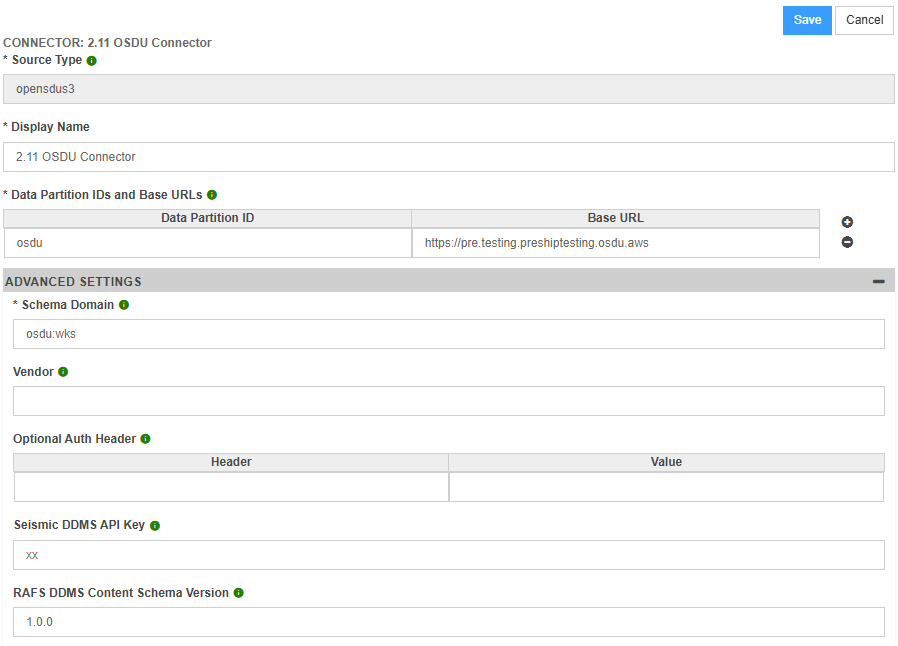
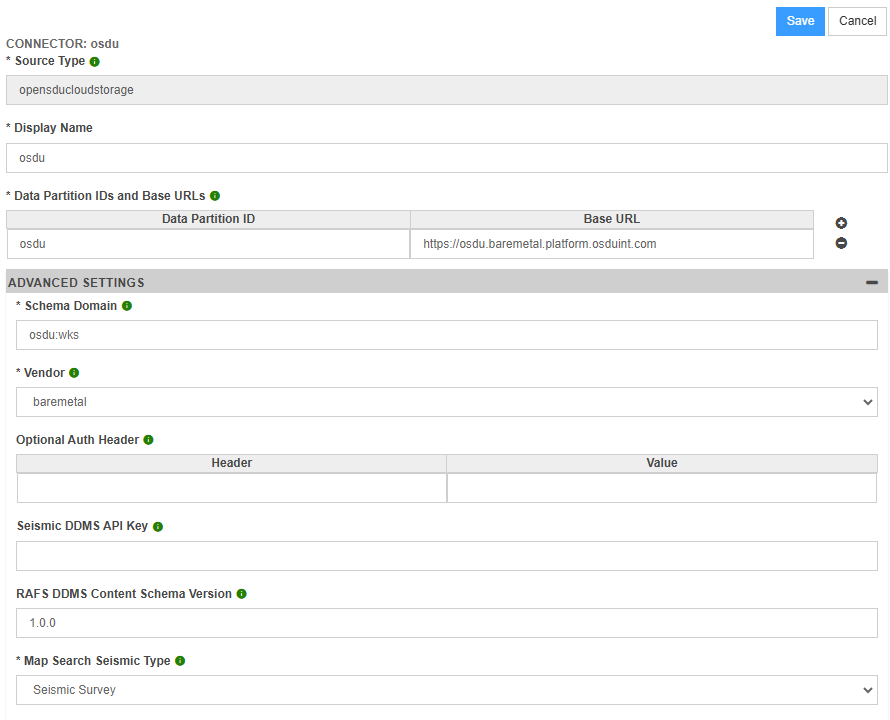
For most deployments, most of the connector properties can be left unchanged except for the Data Partition IDs and Base URLs property.
Populate the Data Partition IDs and Base URLs property with the data partition id and the associated osdu base url. Multiple data partition ids and OSDU base url pairs can be entered.
The AWS & IBM connector properties will have an additional property called Vendor. Set Vender=”ibm” to indicate the connector is an ibm connector otherwise leave it alone.
The GCP & Baremetal connector properties will have an additional property called Vendor. Set Vendor=”barmetal” to indicate the connector is a baremetal connector otherwise leave it alone.
AWS & IBM Connector Properties
GCP & Baremetal Connector Properties
Azure Connector Properties
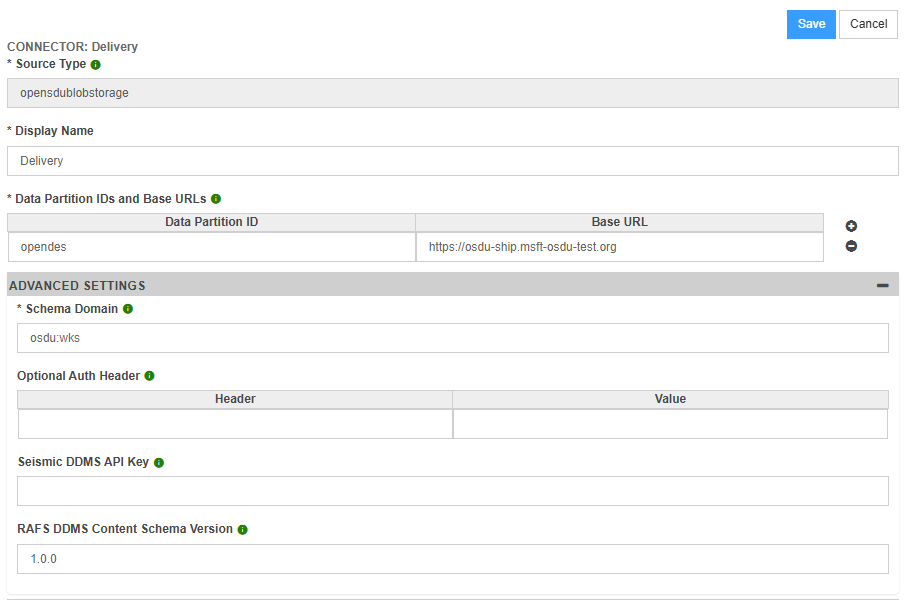
For OSDU Services that require an additional authorization header (such as an appkey header), the Optional Auth Header Key and Optional Auth Header Value need to be populated with the authorization header key and authorization header value respectively.
The Schema Domain should only be changed for deployments where non standard OSDU schemas are used. The standard OSDU schema domain is “osdu:wks”.
For Seismic DDMS, the Seismic DDMS API Key property is used to specify the api key that is used to connect to Seismic DDMS. By default, it is assumed that the Seismic DDMS Api Key is an empty string.
For RAFS DDMS, the RAFS DDMS Schema Content Version property is used in requests to RAFS DDMS. By default, it is assumed that the RAFS DDMS Schema Content Version is 1.0.0.
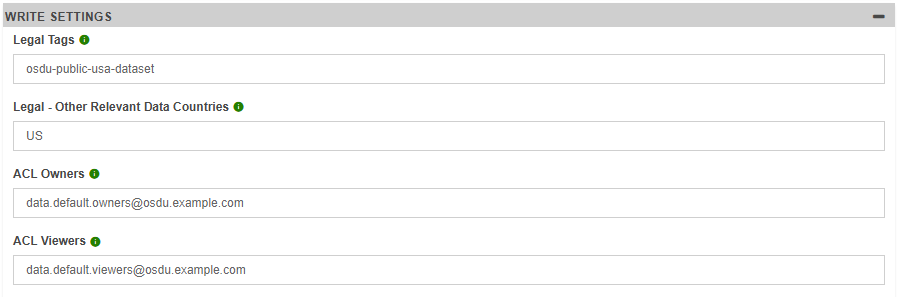
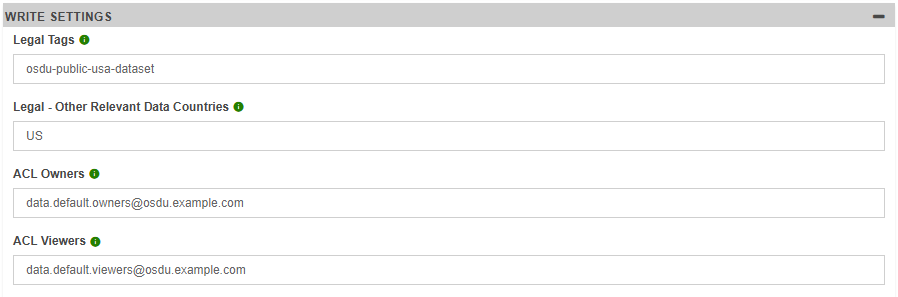
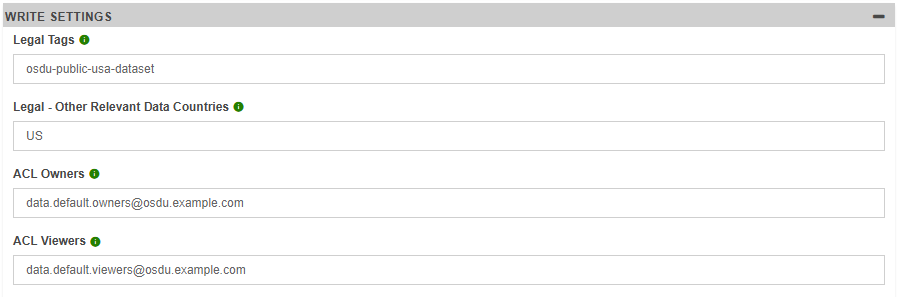
The following connector properties are needed by IVAAP to write data to OSDU:
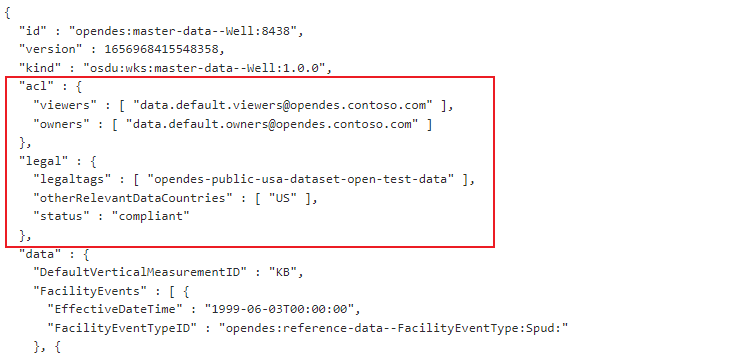
- Legal Tags - This property will be specified in the legal.legaltags field of any OSDU storage record created by IVAAP
- Legal - Other Relevant Data Countries - This property will be specified in the legal.otherRelevantDataCountries field of any OSDU storage record created by IVAAP
- ACL Owners - This property will be specified in the acl.owners field of any OSDU storage record created by IVAAP. The acl.owners field is used by OSDU to determine who has access to modify an OSDU storage record.
- ACL Viewers - This property will be specified in the acl.viewers field of any OSDU storage record created by IVAAP. The acl.viewers field is used by OSDU to determine who has access to view an OSDU storage record.
Below is an example of where these properties will be populated in an OSDU storage record
File Based Configuration
An alternate way to configure connector properties is to use a static file based configuration. This approach can be used in situations where the IVAAP OSDU data nodes are deployed by themselves without other IVAAP components.
In order to support a file based connector configuration, create an directory called ivaapdataconfigs. The location of the ivaapdataconfigs directory can be configured using the IVAAP_DATA_CONFIGS_PATH environment variable. If this environment variable is not specified, then IVAAP will look in the root directory for the ivaapdataconfigs directory.
The ivaapdataconfigs directory should contain folder for each connector type. The following connector types are available for osdu:
- opensdus3 - connectors used for AWS and IBM OSDU instances
- opensdublobstorage - connectors used for Azure OSDU instances
- opensducloudstorage - connectors used for Google and Baremetal OSDU instances
Inside each connector type folder there should be a folder for each connector. Each connector folder will have a file called config.properties. An example directory structure for an ivaapdataconfigs that specifies an opensdus3 connector would look like the following:
ivaapdataconfigs/opensdus3/myconnector/config.properties
The config.properties file will contain the properties of the connector. Properties will be specified in key value pairs with a ‘=’ dividing the keys and values, and a new line used to separate each key value pair. The following keys can be used in the config.properies file:
- searchKindDomain - Represents the Schema Domain property
- dataPartitionIdsAndBaseUrls - Represents the Data Partition IDs and Base URLs property. Each data partition id and base url pair can be separated by a ‘\n’ or ‘>’ character
- vendor - Represents the Vendor property
- optionalAuthHeader - Represents a key value pair of Optional Auth Header property
- seismicDdmsApiKey - Represents the Seismic DDMS API Key property.
- rafsDdmsSchemaVersion - Represents the RAFS DDMS Schema Content Version property
- legalTags - Represents the Legal Tags property
- legalOtherRelevantDataCountries - Represents the Legal - Other Relevant Data Countries property
- aclOwners - Represents the ACL Owners property
- aclViewers - Represents the ACL Viewers property
An example config.properties file is shown below:
dataPartitionIdsAndBaseUrls=osdu>https://r3m16-ue1.preshiptesting.osdu.aws
seismicDdmsApiKey=xx