IVAAP Configuration
Introduction
This section of IVAAP documentation will go into in-depth configuration details regarding IVAAP components.
Backend
Adminserver
Adminserver configuration can be found in two places in values.yaml; .Values.secrets.type.k8sSecrets.adminserver-conf-secrets and .Values.configmap.adminserver. The values in .Values.configmap.adminserver are default values that can be modified, and other environment variables can be added here.
The values in .Values.secrets.type.k8sSecrets.adminserver-conf-secrets are kubernetes secrets, and all values under the secrets section need to be base64 encoded. Plain text values may be used for environment variables under the configmap section as these are utilized more as flags or values that do not need to be secrets.
For steps on how to configure kubernetes secrets, refer to General Helm Configuration Guide's section on native kubernetes secrets.
PostgreSQL Connection and Configmap
Below is required configuration for the Adminserver. All of the secrets are required for PostgreSQL database connection. The two variables shown under .Values.configmap.adminserver are required default values that should not be modified under normal circumstances.
secrets:
  type:
    k8sSecrets:
      adminserver-conf-secrets:
        IVAAP_SERVER_ADMIN_DATABASE_HOST: "database_hostname"
        IVAAP_SERVER_ADMIN_DATABASE_NAME: "database_name"
        IVAAP_SERVER_ADMIN_DATABASE_PORT: "database_port"
        IVAAP_SERVER_ADMIN_DATABASE_USERNAME: "database_username"
        IVAAP_SERVER_ADMIN_DATABASE_ENCRYPTION_KEY: "database_key"
        IVAAP_SERVER_ADMIN_DATABASE_ENCRYPTED_PASSWORD: "database_encrypted_password"

configmap:
  adminserver:
    IVAAP_COMMON_ADMIN_SERVER_HOST: "http://localhost:8080/IVAAPServer/"
    IVAAP_COMMON_BACKEND_SERVER_HOST: "http://ivaap-backend-service/ivaap/"
IVAAP_SERVER_ADMIN_DATABASE_NAME=<database_name>?sslmode=require
If deploying Zalando postgres operator in k3s, ensure that IVAAP_SERVER_ADMIN_DATABASE_HOST is set to ivaap-postgres-cluster.default.svc.cluster.local
Database Migration
For first time deployments, database migration may be required. It is recommended to enable migration for initialization, then remove/disable once migration has completed successfully.
configmap:
  adminserver:
    IVAAP_SERVER_ADMIN_AUTO_MIGRATE: "true"
Virtual File System
Internally the adminserver uses what is known as the ‘Virtual File System’, or VFS, where configuration files, default systems, and other data are stored as files inside the postgres database, modeled after Apache ZooKeeper. Important configuration such as authentication, map and schematic data, and others are stored in this system.
The data is stored in a hierarchical format, uploaded as a zip file of directories, and can be navigated and edited through the Admin UI of IVAAP, with SuperAdmins able to set defaults for all domains, and regular Admins able to edit within their single domain. Please refer to the Admin UI documentation for information regarding editing and using VFS in the UI, and the Backend Developer Wiki for more information of the syntax and content of VFS configurations.
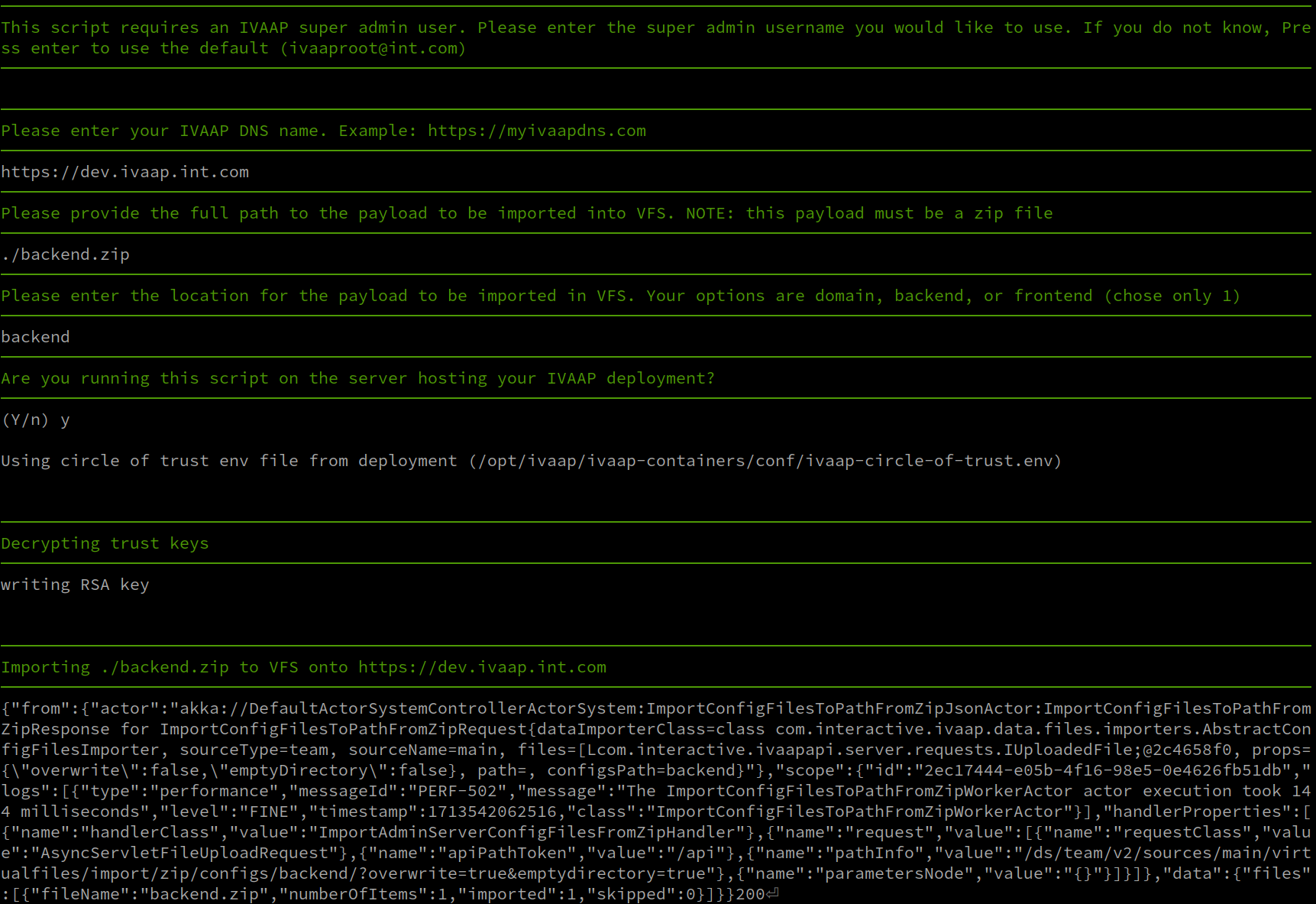
From a deployment operations perspective, it’s also possible to upload the zip files from the command line using curl against the IVAAP Adminserver api directly (/IVAAPServer). SLB has crafted an interactive script that can be found in the “ivaap-helpers” public repository’s scripts directory. There are also some default configuration templates in ivaap-helpers, below is a short example of use:
Backend Core and Data Nodes
Environment Variable Options
For more information, see the backend wiki page: https://sites.google.com/a/geotoolkit.net/ivaap-for-developers/configuring-ivaap/developer-configuration-options
The helm template has common backend variables already pre-configured in templates/_helpers.tpl
{{- define "ivaap.globalBackendNodeEnv" }}
  - name: IVAAP_CLUSTER_DATANODES
    value: "{{ include "ivaap.backendClusterDataNodes" . }}"
  - name: IVAAP_SEEDNODE_HOSTNAME
    value: "localhost"
  - name: IVAAP_CLUSTER_HOSTNAME
    value: "localhost"
  - name: IVAAP_INTERNAL_ENDPOINT
    value: "localhost:9000"
  - name: IVAAP_COMMON_BACKEND_SERVER_HOST
    value: "http://localhost:9000/ivaap/"
  - name: IVAAP_COMMON_ADMIN_SERVER_HOST
    value: "http://adminserver-service/IVAAPServer/"
  - name: IVAAP_SERVICES_TIME_OUT
    value: "120000"
  - name: IVAAP_HTTP_METHOD_TIMEOUT
    value: "300000"
{{- end }}
You can print the current list of live environment variables applied to a pod with the kubectl command.
user@linux:~$ kubectl exec ivaap-backend-deployment-6f5575b6ff-9wwnh -n ivaap -c epsgnode -- printenv
PATH=/opt/java/openjdk/bin:/usr/local/sbin:/usr/local/bin:/usr/sbin:/usr/bin:/sbin:/bin
HOSTNAME=ivaap-backend-deployment-6f5575b6ff-9wwnh
JAVA_HOME=/opt/java/openjdk
LANG=en_US.UTF-8
LANGUAGE=en_US:en
LC_ALL=en_US.UTF-8
JAVA_VERSION=jdk-21.0.7+6
IVAAP_CONTAINER_BASE_IMAGE_BUILD_TIMESTAMP=20250620T002603Z
IVAAP_CONTAINER_BASE_IMAGE_BUILD_TIMESTAMP_UNIX=1750379163
IVAAP_CONTAINER_BASE_IMAGE_FROM=eclipse-temurin:21-jdk-alpine
IVAAP_CONTAINER_BASE_IMAGE_STATIC_TAG=245634265005.dkr.ecr.us-west-2.amazonaws.com/ivaap/base-images-release:backendnode-base-alpine-3.0-20250620T002603Z
Any environment variable can be added to a node via .Values.nodEnvConfigMaps.<nodename>. This is a dynaic configmap that is created based on node names added under nodeEnvConfigMaps.
nodeEnvConfigMaps:
  playnode:
    IVAAP_ENVIRONMENT_VARIABLE: "VALUE"
.Values.nodEnvConfigMaps.<nodename> matches the node name under .Values.ivaapBackendNdoes. For example, the above playnode matches .Values.ivaapBackendNodes.coreNodes.playnode
ivaapBackendNodes:
  coreNodes:
    playnode:
      repoName: ivaap/backend/playnode
      tag: playnode-3.0-3-0af410b-20250708T223606Z
mongonode, we need to ensure the node name for .Values.nodEnvConfigMaps.<nodename> matches what is found in .Values.ivaapBackendNodes.dataNodes.mongonode:
ivaapBackendNodes:
  dataNodes:
    mongonode:
      enabled: false
      repoName: ivaap/backend/mongonode
      tag: mongonode-3.0-6-77b1f74-20250708T223606Z

# ----- mongonode variable applied below
nodeEnvConfigMaps:
  playnode:
    IVAAP_ENVIRONMENT_VARIABLE: "VALUE"
  mongonode:
    IVAAP_ENVIRONMENT_VARIABLE: "VALUE"
Tuning Memory Requirments
By default, most IVAAP data nodes ship with a max Java heap size of 2 GB. This suits most deployments, but can sometimes be beneficial to raise this limit for large datasets or other purposes.
Internally the nodes use a startup script that references an environment variable IVAAP_JVM_MAX_MEMORY. So the jvm Xmx value can be manipulated by updating this envar.
For example, setting the witsmlnode to 4gb (4096m) will look something like this under .Values.nodEnvConfigMaps.<nodename>:
nodeEnvConfigMaps:
  witsmlnode:
    IVAAP_JVM_MAX_MEMORY: "4G"
Custom JAVA_OPTS
It can be complicated or ambiguous to add to $JAVA_OPTS envars due to container contexts mixing in/outside of the container depending on the deployment type, so we have added an additional standalone environment variable in our node startup script as IVAAP_NODE_JAVA_OPTS.
For context, see startup script snippet here:
/bin/sh -c "/opt/ivaap/ivaap-playserver/deployment/ivaapnode/bin/${IVAAPNODE_NAME} -J-Dpidfile.path=/dev/null -J-Djava.io.tmpdir=${IVAAP_CONTAINER_TMP_DIR} -J-Xmx${IVAAP_JVM_MAX_MEMORY} ${IVAAP_NODE_JAVA_OPTS}"
nodeEnvConfigMaps:
  witsmlnode:
    IVAAP_NODE_JAVA_OPTS: "-Dcom.interactive.ivaap.data.WitsmlReadTimeOut=30000"
    IVAAP_JVM_MAX_MEMORY: "4G"
Tuning ActiveMQ
IVAAP’s connection to ActiveMQ is tuneable to increase retry counts and times when it could be useful due to different environments. By default this is set as shown in values.yaml section configmap, but can be configured in your deployment yaml.
configmap:
  backendactivemq:
    IVAAP_WS_MQ_CONN_RETRY_COUNT: 20
    IVAAP_WS_MQ_CONN_RETRY_INTERVAL: 5000
NGINX Reverse Proxy
IVAAP uses a customized NGINX reverse proxy for cross-pod communication. This proxy image has many customization options available to customize the deployment.
Adding a Custom Config
A custom NGINX configuration file can be added easily. To do this requires a few steps:
* Create a file with the custom config, indented 4 spaces.
* Create a configmap from the new file.
* Set .Values.ivaapProxy.proxy.customConf.enabled to true in your configuration yaml.
* Set .Values.configmap.proxy.IVAAP_PROXY_CUSTOM_CONF_ENABLED to true.
Below is an example of what the custom configuration file could look like. The structure is important and must be indented 4 spaces. Follow NGINX official documentation for creating custom configurations.
    location /api/ {
       proxy_pass https://<FQDN>.com/api/;
       add_header 'Access-Control-Allow-Origin' '*';
       add_header 'Access-Control-Allow-Methods' 'POST, GET, OPTIONS, DELETE, PUT';
       tcp_nodelay on;
       proxy_buffering off;
       proxy_connect_timeout 1d;
       proxy_send_timeout 1d;
       proxy_read_timeout 1d;
    }
Once this file is created, create a configmap named custom-nginx-conf using the full path of this new file.
kubectl create configmap custom-nginx-conf \
  --from-file=custom-nginx.conf=/path/to/custom-nginx.conf \
  -n ivaap
Now, simply set .Values.ivaapProxy.proxy.customConf.enabled and .Values.configmap.proxy.IVAAP_PROXY_CUSTOM_CONF_ENABLED to true in your deployment yaml, and re-deploy. Once the proxy pod is healthy, the easiest way to confirm is the exec in and cat the nginx configuration file and verify the new config is preset.
user@linux:$ ki exec <namespace> proxy
/ $ cat /etc/nginx/conf.d/https-k8s-nginx.conf
Updating Infrastructure passwords and Keys
IVAAP makes use of several passwords and keys uniquely pre-packaged for use once deployed. They are encrypted and base64 encoded so as not to leave them in plain text on the file system or configuration files, so to update them, the new passwords or keys must be encrypted. IVAAP uses its own encryption method, but this section will also touch on ActiveMQ passwords which use its own system from Apache.
Encrypting Sensitive Passwords for IVAAP Java Components
The following process will be used in multiple aspects of IVAAP configuration regarding encrypted values.
Should you ever need to update an encrypted password, a new one can be generated with the IVAAPCoreData jar.
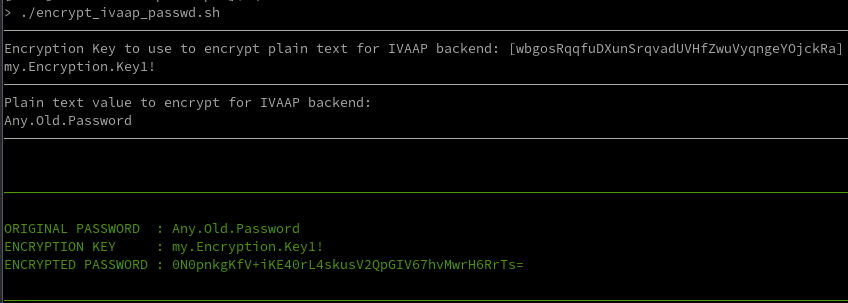
Once ready to encrypt a new password, select an appropriate encryption key and use the generation script found in our ivaap-helpers repo: ivaap-helpers/scripts/encrypt_ivaap_passwd.sh. This interactive script will take input of the plain text password, encryption key, and return the encrypted value. The Encryption key configuration varies depending on the use in IVAAP, but should be next to the encrypted configuration.
Updating Circle of Trust Keys
Circle of Trust keys are needed for authentication between IVAAP components. By default, IVAAP deliveries come preconfigured with unique keys and passwords with no additional changes required, but should you wish to rotate keys or create a new unique deployment, these are the steps needed to change the Circle of Trust keys.
The Circle of Trust uses 2048 bit RSA keys, and the private key must be PKCS#8 format. The private key must then be encrypted with an AES encryption key of your choice, using the same encryption method as was used for service accounts in previous IVAAP versions, using an IVAAPCoreData jar.
The easiest way to create the circle of trust keys is to use our circle-of-trust.sh script in ivaap-helpers.
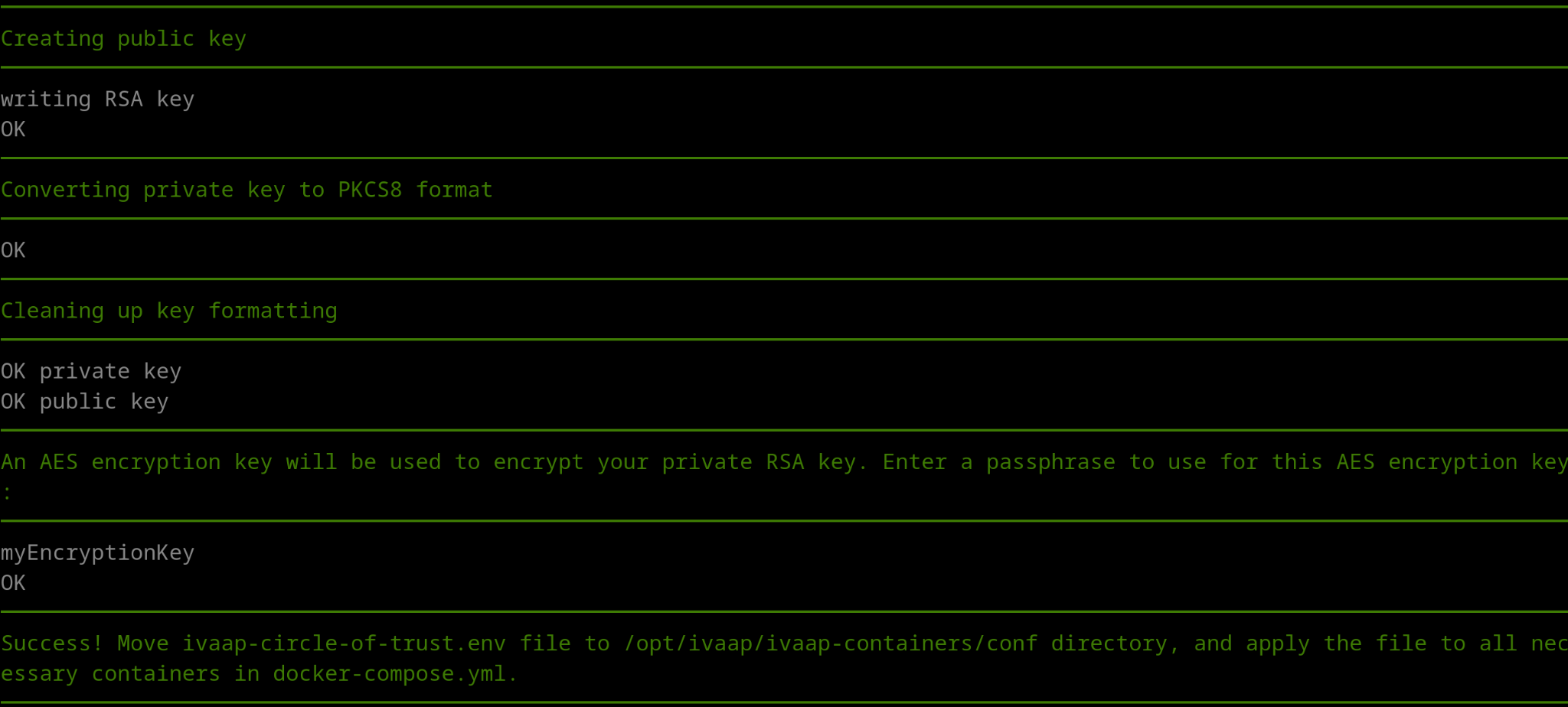
The script will do all the work for you by creating all of the necessary RSA keys, prompting you to enter a password to use as the encryption key, and using that encryption key to encrypt the RSA private key.
This will create a file named ivaap-circle-of-trust.env, which will contain the three values needed for circle of trust configuration. Once you have these new values, they need to be updated in your deployment yaml under .Values.secrets.type.k8sSecrets:
secrets:
  type:
    k8sSecrets:
      circle-of-trust-secrets:
        IVAAP_TRUST_PRIVATE_AES_ENCRYPTION_KEY: "<aes-encryption-key>"
        IVAAP_TRUST_PRIVATE_KEY: "<encoded encrypted-pkcs8-private-key>"
        IVAAP_TRUST_PUBLIC_KEY: "<encoded public-key>"
Updating ActiveMQ Password
The packaged instance of ActiveMQ often included with IVAAP deployments uses standard practices built into ActiveMQ to encrypt its passwords:
https://activemq.apache.org/encrypted-passwords
In IVAAP, ActiveMQ message broker communicates with the backend via an encrypted password called “ivaap.password.” This password is configurable for both the backend Playnode and MQGatewaynode, as well as ActiveMQ itself. The environment variable for this configuration is IVAAP_WS_MQ_QUEUE_PASSWORD.
You can shell into the ActiveMQ pod and follow the same procedures from Apache’s documentation:
user@linux:~$ kubectl exec -it ivaap-activemq-deployment-6b6956684f-9v5c7 -n ivaap -- bash

cb66558b530:~$ bin/activemq encrypt --password activemq --input myNewPassword
...
...
...
Encrypted text: kT/L1Z0xTEkmg2CrPf0NmMyZhPmPNpUE
Once a new encrypted password has been generated, it will need to be applied to the environment variable IVAAP_WS_MQ_QUEUE_PASSWORD in the secrets section of your deployment yaml underneath .Values.secrets.type.k8sSecrets.activemq-conf-secrets. Please note that the new encrypted password is inside “ENC().” This is required and lets ActiveMQ know the password is encrypted.
# ---- IVAAP_WS_MQ_QUEUE_PASSWORD="ENC(kT/L1Z0xTEkmg2CrPf0NmMyZhPmPNpUE)"

secrets:
  type:
    k8sSecrets:
      activemq-conf-secrets:
        IVAAP_WS_MQ_QUEUE_PASSWORD: "<base64-encoded-activemq-password>"
Updating Postgres Password
This section covers updating the Postgres password as it is used by IVAAP, not how to change the password on particular Postgres instances/types/servers. Updating the Postgres password means updating it in the Adminserver.
Adminserver (Java)
Follow the encryption process detailed above in ‘Encrypting Sensitive Passwords for IVAAP Java components,’ then set the following envars in the your deployment yaml under the secrets section.
adminserver-conf-secrets:
  IVAAP_SERVER_ADMIN_DATABASE_ENCRYPTION_KEY: "<Encoded Key>"
  IVAAP_SERVER_ADMIN_DATABASE_ENCRYPTED_PASSWORD: "<Encrypted & Encoded Password>"
Relocating and Splitting Up Infrastructure Hosts
For convenience, IVAAP typically comes packaged to run on container orchestration platforms such as Kubernetes, K3s, or Openshift, and can be deployed to cloud-managed services like AWS EKS or AZURE AKS. This architecture is more flexible and production ready. While the platform can run on a single environment for development, testing, or production, optimal performance is achieved by distributing key components, such as the database and backend services to separate hosts.
Relocating Postgres Database
The first piece of infrastructure to consider relocating is the Postgres database. The process outlined here will start with a database dump from an existing database, so the first step is to make that dump as outlined in the ‘Making Backups’ section of this guide. Once a valid dump file is in hand, we can proceed with the switch. For steps on creating a postgres dump, refer to the Making and Restoring Backups section of the IVAAP Operations guide. Additionally, refer to the ivaap_pbdump section of the IVAAP Helpers guide.
At this point, restore the dump made on the new host or managed service. This will vary depending on target, so please refer to their specific documentation, or else official Postgres documentation.
Now adjust configuration on the IVAAP instance for the new Postgres host. Start by including newly secret managed encrypted and encoded values into your deployment yaml.
These additions to the environment variables below will authenticate the adminserver to Postgres.
adminserver-conf-secrets:
  IVAAP_SERVER_ADMIN_DATABASE_HOST: "<database_hostname>
  IVAAP_SERVER_ADMIN_DATABASE_NAME: "<database_name>"
  IVAAP_SERVER_ADMIN_DATABASE_PORT: "<database_port>"
  IVAAP_SERVER_ADMIN_DATABASE_USERNAME: "<database_username>"
  IVAAP_SERVER_ADMIN_DATABASE_ENCRYPTION_KEY: "<database_encrypted_key"
  IVAAP_SERVER_ADMIN_DATABASE_ENCRYPTED_PASSWORD: "database_encrypted_password>"
Relocating Mongo Database
For Mongo, all that must be changed is in the Admin UI in the browser. Change relevant Mongo connectors hosts. See Admin UI Manual for more details.
IVAAP in Production Environments
The preceding guide assumes IVAAP is deployed on a single host for ease in setting up a poc/test environment. When considering deploying IVAAP for use in production, a few considerations are recommended:
Persisting Data Stores Externally
It’s recommended to move persisted data stores to a different host than the one IVAAP front/backends are deployed to for reliability, this includes MongoDB, PostgreSQL, and ActiveMQ in descending order of priority per performance. See Relocating and Splitting Up Infrastructure Hosts section in IVAAP Configuration chapter.
Logging Configuration
INT recommends shipping logs to an external server for production environments to better monitor/alert the health of the system. We have separate documents regarding the configuration of ELK with IVAAP, or alternatively use a local mirroring tool like Dozzle.
Also see the section under Troubleshooting: Enable Additional Logging Levels (Debug) to adjust the log level for components as needed.
Further reading:
- Log Shipping
- https://kubernetes.io/docs/concepts/cluster-administration/logging/
- https://www.cncf.io/blog/2023/07/03/kubernetes-logging-best-practices/
- ELK
- https://www.redhat.com/sysadmin/what-is-elk-stack
- ELK with IVAAP (ask SLB)
- Dozzle
- https://hub.docker.com/r/amir20/dozzle/
- Dozzle with IVAAP (ask SLB)